WordStar Dot Commands, Print Controls, and High-Bit Wrap
The “markup” in a .WS file is not broken Word — it is the format.
TL;DR
Dot commands set page length, headers, and footers. Print controls mark bold, underline, and strike. High-bit wrap is a flag, not a letter. WordStar Converter maps those layers instead of dumping them into the body.
Why fidelity reviews fail on “plain text” dumps
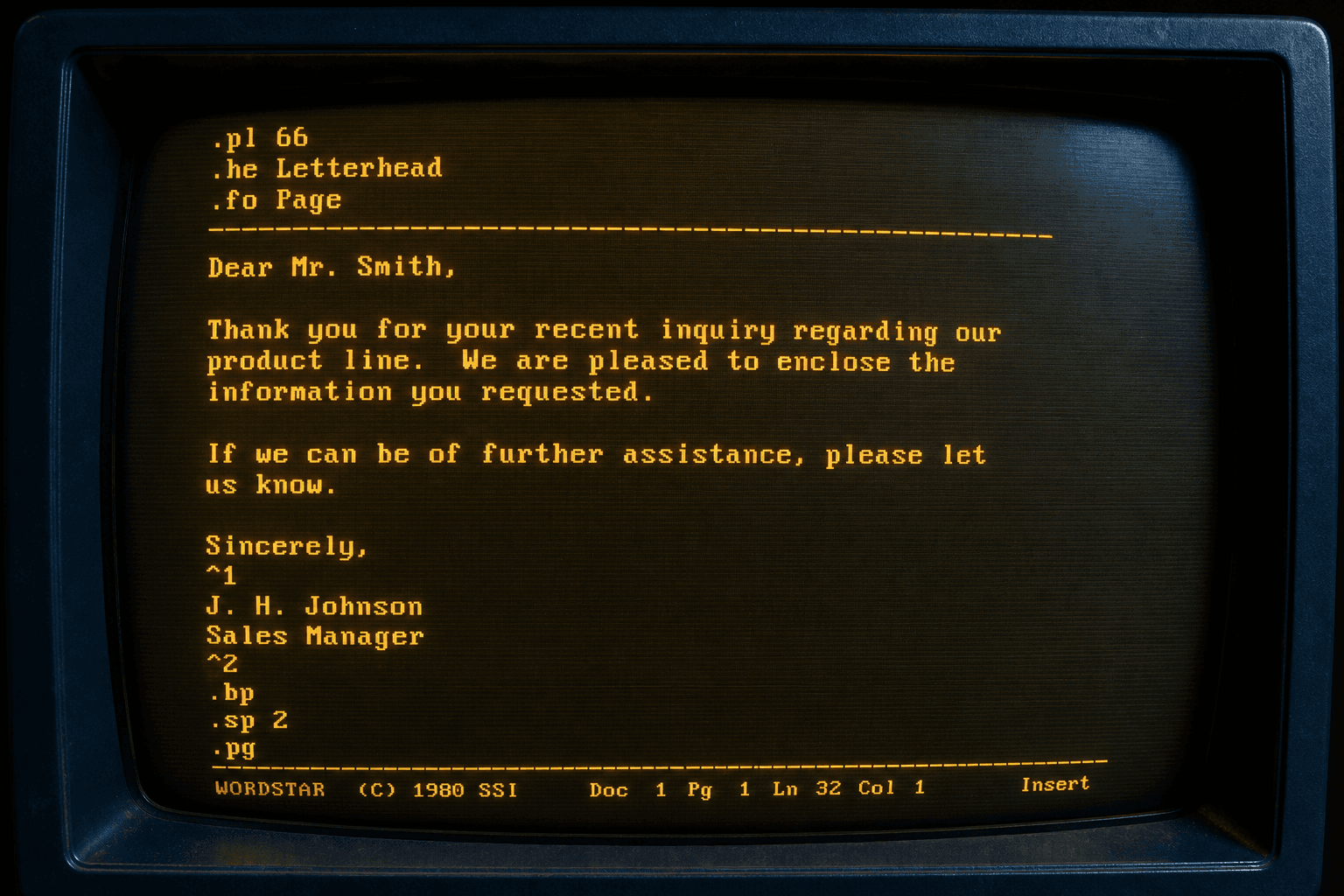
A hex dump or Notepad open of a `.ws` file looks almost readable — until every other word ends in an accented letter and `.he Acme Legal` appears in the middle of a paragraph. That is not corruption. It is the WordStar encoding model.
QA for a migration should ask: did wrap become ordinary paragraphs, did emphasis become real runs, and did page setup leave the body? If any answer is no, the tool did not finish the job.
Dot commands
Lines that start with a period in column one are instructions, not prose. `.pl` is page length (often 66 for letter paper). `.mt` / `.mb` are top and bottom margins. `.he` and `.fo` are header and footer. `.pa` forces a page break. `.op` / `.pg` govern page numbering.
If a converter leaves `.he Acme Legal` in the paragraph stream, it did not understand the format. In PDF and DOCX targets, those commands should become page geometry and running heads — or be intentionally omitted with a logged reason — not printed as body text.
Common dot commands you will see in archives
- `.pl n` — page length in lines
- `.mt n` / `.mb n` — top / bottom margin
- `.lm n` / `.rm n` — left / right margin
- `.he` / `.fo` — header / footer text (optionally odd/even)
- `.pa` — unconditional page break
- `.cp n` — conditional page break if n lines will not fit
- `..` or `.ig` — comments that should not print
Print controls in the text stream
Bytes `00h–1Fh` toggle appearance. Classic examples: bold (`02h` / `^B`), underline (`13h` / `^S`), strike (`18h` / `^X`), italic in later releases (`19h` / `^Y`). They are toggles embedded between characters, not styles attached to a paragraph object the way Word stores them.
A native parser turns those spans into character runs in DOCX/RTF/ODT, or into tagged emphasis in HTML/Markdown. Leaving the control bytes visible is a failed conversion.
Extended characters and symmetrical sequences
`1Bh xx 1Ch` inserts an extended character — often an OEM glyph that should become Unicode (smart quotes, accented letters, punctuation that looked like line-drawing in a wrong code page). Treat the triplet as one character, not three.
From Release 5 onward, `1Dh` starts symmetrical sequences for richer features. Tools that only strip high bits will quietly destroy those sections. Versioned files such as `.ws5`–`.ws7` are where this shows up most often.
High-bit wrap
The last character of a word that wraps has its high bit set. Unwrap it to a space or line break depending on soft-return rules. Leave it, and every other word looks like mojibake.
Soft carriage returns (`8Dh` followed by linefeed) and soft spaces (`A0h`) appear for justification and wrap. They are layout hints, not user-typed characters. PDF and DOCX builders must normalize them.
How to sample fidelity before a bulk run
Pick three documents: a letter with `.he` / `.fo`, a long manuscript chapter with dense wrap, and a file that uses extended characters. Convert each to DOCX and PDF. Read them the way a human will — not only as hex diffs.
WordStar Converter’s trial (10 files) is sized for that sampling. Standard ($39.95) covers the tree once samples pass.
What “good enough” looks like in DOCX vs PDF
DOCX should reflow cleanly in Word with emphasis intact. PDF should show stable pages with headers where the dot commands asked for them, and a real text layer you can search — not a screenshot of a DOS screen.
For the deep format walkthrough aimed at operators, pair this article with WordStar to PDF and WordStar to Word.
Related reading
Convert with the controls intact
Trial 10 files. Standard $39.95.
Free trial
Full app features — up to 10 files
Windows 10 or 11
Download the Windows installer for the full 10-file trial. Same app you unlock with a license — 100% local on your PC.